We may receive a fee from trusted installers when you request a quote, or a commission when you buy through links on our site. This helps us keep our content independent, well-researched and up to date – Learn more
- EV and battery giant adds new heat pump tool to help households make better use of their energy
- You need a compliant heat pump along with the Powerwall 3 to take advantage
- Households can “save money when rates are high”, according to Tesla
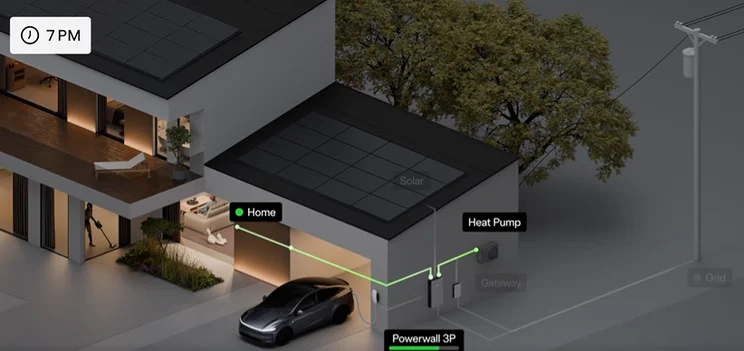
Households with a heat pump could soon have the chance to save even more of their energy, thanks to Tesla fitting their Powerwall 3 with a Heat Pump Optimisation tool.
The EV and battery giant has added the tool to their Powerwall 3 to give customers and households more control over their solar energy, and also to help them access cheap power.
Traditionally, a Powerwall battery charges itself from solar panels and then discharges that stored electricity to power the home when the sun goes down or when grid prices spike, like any top-of-the-range battery.
With Heat Pump Optimisation, when the Powerwall 3 or the industrial three-phase Powerwall 3P detects that solar production is running ahead of the home’s current electrical demand, and that the battery is charged up 100%, it can send a signal to a compatible heat pump telling it to ramp up activity.
The heat pump then heats water more aggressively than it otherwise would, using that abundant and essentially free solar energy to build up something called a thermal reserve in the hot water tank.
The result is that surplus solar power, which might otherwise be sold back to the grid at unfavorable export rates, gets converted into stored heat that the household will consume anyway.
In a statement on X, the company said Heat Pump Optimisation will allow the Powerwall 3 to “boost heating when there’s surplus solar or energy is inexpensive”. This would help households “save money when rates are high”, it said.
How does Tesla Powerwall 3’s Heat Optimisation Work?
- Firstly, with Heat Pump Optimisation, the Powerwall 3 manages your heat pump operation based on energy prices and how much power your solar panel system is generating
- Your heat pump receives signals from Powerwall to boost operation when energy costs are lowest, aiming to reduce your electricity bill while maintaining comfort
- Powerwall 3 then tracks energy costs and available solar energy throughout the day and sends recommendations to your heat pump to ‘boost’ or operate in ‘normal’ mode
- Once Heat Pump Optimisation sends a recommendation, it’s up to your heat pump to accept or ignore the recommendation
- When conditions are optimal for storing thermal energy, Powerwall tells your heat pump to boost, heating water beyond your immediate needs. This thermal storage allows your heat pump to run less when energy is more expensive
Heat Pump Optimisation adjusts its strategy depending on your Powerwall operating mode:
- Savings mode: In Savings mode, Powerwall will instruct your heat pump to boost operation when lowest-cost energy is available from either the grid or solar.
- Self-Powered mode: In Self-Powered mode, Powerwall will instruct your heat pump to boost operation if excess solar energy is available after powering all other loads.
How do I use Heat Pump Optimisation?
If your home energy system meets the minimum requirements for Heat Pump Optimisation, the feature will be automatically enabled and running in the Tesla app.
At the bottom of your energy home screen in the Tesla app, you can see if Heat Pump Optimisation is currently recommending if your heat pump should boost operation or continue operating at normal levels. Home Status also explains in real-time what recommendation Heat Pump Optimisation is sending and why.
What are the minimum requirements for Heat Pump Optimisation?
To use Heat Pump Optimisation, you must have:
- Powerwall 3 with firmware version 26.26 or higher
- Any SG-Ready certified heat pump with an accessible SG-2 contact
- Tesla app version 4.59.1 or higher